April 13, 2026
By Ganesh Mannamal, Founder at Parsec Flow Studios
Why Contractor Websites Don't Generate Leads: What to Fix First
Most contractor websites look fine but produce no calls. Here's how to diagnose why your website isn't converting local traffic, and what to fix first.

A plumber in the Detroit suburbs has a website. Not bad, not embarrassing. Service photos, a contact page, a few lines about the business. They run Google Ads and get calls from those. From organic search, almost nothing.
The website exists. It just doesn’t work.
This is the situation many contractors are in. The problem is not that they have no web presence — it’s that their website was built to look credible, not to produce contacts from local search. Those are different goals and they produce different results.

Key Takeaways
- Dedicated service pages help contractor websites rank for service-specific local searches.
- Phone numbers buried in footers or on separate contact pages reduce how many visitors call.
- Google uses the mobile version of your site for both ranking and indexing.
- Visible reviews, license information, and service area help visitors decide to contact you.
- Organic search traffic often lands on service pages, not the homepage.
- If GBP clicks aren’t converting to contacts, the problem is usually on the site itself.
What It Means for a Website to Generate Leads
A contractor website generates leads when a visitor from local search takes a contact action: a call, a form submission, or a booking request. Not visits. Not page views. Contacts.
Most contractor websites are measured by how they look at launch, not by what they produce month over month. The right question is not “does this look professional?” It’s “does a homeowner searching for drain cleaning in my city find this page, trust it, and call?”
Those are two different standards. A site can look clean and still fail the second one completely.
Why Most Contractor Websites Don’t Convert Local Traffic
In most cases, the reasons are architectural, not cosmetic. A redesign that doesn’t address the underlying gaps produces the same results as the old site.
No Dedicated Service Pages
The most common gap: one “Services” page that lists everything the contractor does. Drain cleaning, water heater repair, sump pump installation, emergency plumbing — all on a single page.
Google ranks individual pages against individual searches. A homeowner searching “drain cleaning Sterling Heights MI” needs a page that is specifically about drain cleaning in Sterling Heights. A list page that mentions drain cleaning in a bullet point is unlikely to rank for that search, and less likely to convert the visitor if they somehow land on it.
In practice, you need a dedicated page for each service if you want to rank for service-specific searches.
One page for everything
/services- Drain cleaning
- Water heater repair
- Sump pump installation
- Leak detection
- Emergency plumbing
Ranks for none of these specifically
One page per service
- /drain-cleaning
- /water-heater-repair
- /sump-pump-installation
- /leak-detection
- /emergency-plumbing
Each page can rank for its specific search
Contact Information Is Hard to Find
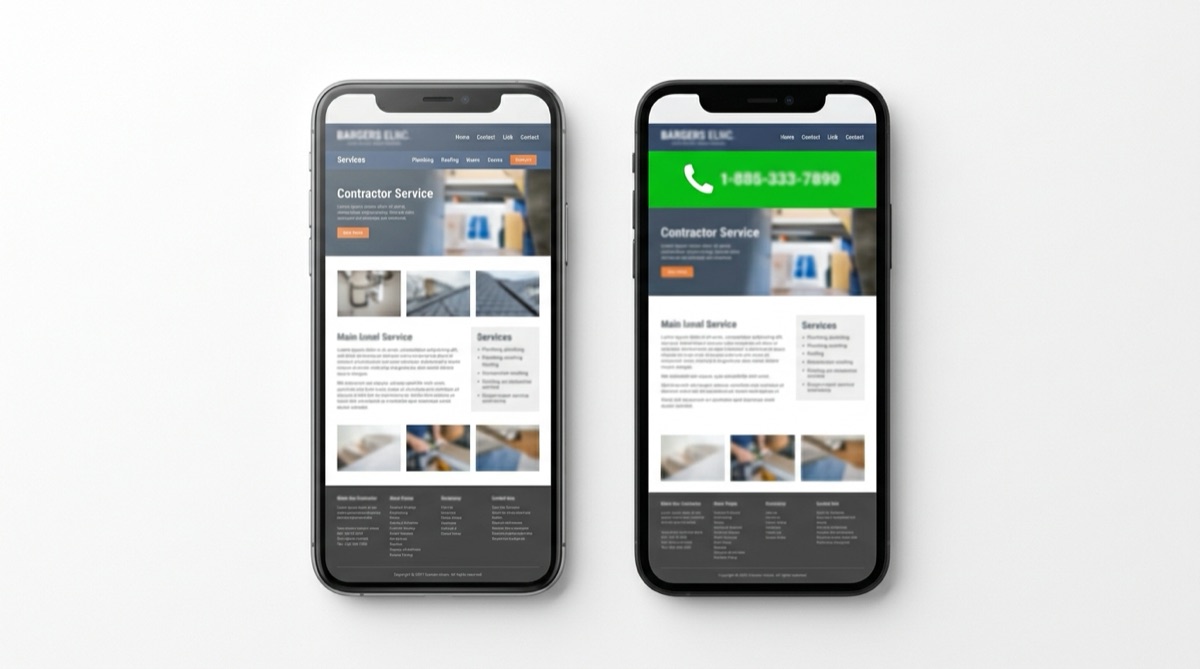
If a visitor has to scroll to the footer, navigate to a Contact page, or hunt for a phone number, most won’t. On mobile, someone at a decision point — burst pipe, no heat, tripped breaker — will move to the next result before they dig for contact details.
A phone number with a tap-to-call link belongs on every page, visible without scrolling. The same is true on desktop. Burying contact information is one of the most common and most costly mistakes contractors make with their websites.
No Clear Primary Action
A navigation with six equal items — Services, About, Gallery, Blog, FAQ, Contact — gives a visitor no signal about what the most important next step is. For most contractors, the answer should be clear: call or request a quote. Everything else on the site should support that, not compete with it.
When every item in the nav carries equal visual weight, visitors don’t know where to go next. Most won’t figure it out — they’ll leave.
No Trust Signals Visible Without Scrolling
Before a homeowner calls a contractor, they want answers to a few basic questions: Do you serve my area? Do you actually do this service? Are you licensed? Do other customers trust you? Can I verify any of this?
A homepage that leads with a full-width photo and a tagline like “Quality service you can trust” answers none of those questions. Reviews with a count and rating, years in business, license number, service cities — these are the proof points that answer the credibility questions. If they require scrolling to find, many visitors will leave before they see them.
Not Optimized for Mobile
Most homeowners searching for plumbers, HVAC companies, or electricians are doing it on their phones — usually mid-problem, not at a desk. Per Google’s guidance on mobile-first indexing, Google uses the mobile version of your site for ranking and indexing. A slow or hard-to-navigate mobile experience can affect both how many visitors convert and where the site ranks.
A practical rule of thumb: open your website on your own phone and try to complete the contact action. If it takes more than two taps and ten seconds, treat that as a problem worth fixing.
Visitors Can’t Tell What Cities You Serve
“Serving the greater metro area” is not useful to a homeowner in a specific suburb. Someone in Troy, Michigan wants to know you serve Troy — not that you cover “the area.” Without explicit service area mentions on individual service pages, visitors make the reasonable assumption you don’t cover them and move on.
Service pages that explicitly name cities and neighborhoods tend to perform better in local search than those that don’t.
If two or three of those gaps describe your site, the self-audit below takes about 20 minutes to run through.
How to Audit Your Own Website
You can complete this audit in about 20 minutes. Most of it requires no tools.
Step 1: Check Your Mobile Experience
Open your website on your phone. How long does it take to find your phone number? Can you tap the contact button without zooming? Is the page slow to load?
For a free objective measure, run your site URL through Google PageSpeed Insights. The mobile score and the “Opportunities” section tell you exactly what’s slowing the page down.
Step 2: Count Your Dedicated Service Pages
List your top five revenue-generating services. Open your website and check: does each have its own URL and dedicated page, or do they all live on a single “Services” page?
If the answer is a single page, that is the first thing to fix. Google ranks individual pages. If you want to show up for five different services, you’ll generally need a dedicated page for each.
Step 3: Check Contact Visibility
From your homepage, how many clicks does it take to reach your phone number? The answer should be zero — it should be visible on the page without any action. Check this on mobile, not just desktop.
Also check: is the phone number a tap-to-call link? On mobile, a phone number that isn’t clickable requires the visitor to copy it manually and open their dialer. Most won’t.
Step 4: List Your Trust Signals
What can a first-time visitor verify on your homepage without scrolling? Write down everything: star rating and review count, license or insurance information, years in business, service area, team photo. If your list has fewer than three items, you are asking visitors to call based on no verifiable information.
Step 5: Assess Your Calls to Action
On each service page, what is the most prominent action? Not what’s in the navigation — what stands out visually on the page itself. If the answer is unclear, a visitor will not guess. They’ll leave.
Each service page should have one obvious primary action: call now, request a quote, or book online.
If the audit turns up gaps, the section below covers the most common approaches — and where they tend to fall short.
Common Mistakes When Trying to Fix This
1. Building a Brochure Instead of a Lead Tool
Most contractor websites are designed to look trustworthy, and that is not a bad goal. But looking trustworthy and turning visitors into contacts are different outcomes. A brochure site answers “who we are.” A site built to bring in inquiries answers “do you serve my area, do you do this service, can I trust you, and how do I contact you” — in that order, on every page.
2. Treating the Homepage as the Entry Point
For many contractor sites, organic search traffic lands on service pages or location pages rather than the homepage. If those interior pages don’t stand on their own — clear CTA, visible contact information, verifiable credentials — traffic won’t convert even if the homepage is well-designed.
3. Adding More Content Instead of Better Structure
A website with 20 blog posts and no dedicated service pages is unlikely to rank for specific service searches. Google ranks individual pages against individual queries — a blog post about “drain cleaning tips” is not a substitute for a page that specifically covers drain cleaning in your city. Getting the page architecture right produces more local search value than blog content volume.
4. Assuming a Redesign Fixes It Automatically
A new website that doesn’t address the underlying page organization will produce the same results as the old one. If the redesign doesn’t include dedicated service pages, contact visibility on every page, and credibility cues above the fold, the problems persist regardless of how the new site looks.
Want to see where your local SEO is leaking calls?
Get a free local growth audit with practical findings on your Google Business Profile, service pages, and local visibility.
Get Your Free AuditComposite Example: Plumbing Company in the Detroit Suburbs
The following is a composite example based on the types of situations we commonly see. The specifics are illustrative.
Sterling Plumbing serves Warren and several surrounding suburbs in the Detroit metro. Their website — a five-page site built a few years earlier — had a single Services page listing eight services, a phone number only in the footer, no visible reviews or ratings, and no mention of which cities they actually covered. It looked reasonable. When pressed, the owner acknowledged that almost every call he could trace came through Google Ads. Organic was producing almost nothing.
Over the course of about a month, they built out five dedicated service pages (drain cleaning, water heater repair, sump pump installation, leak detection, emergency plumbing), each listing the specific cities covered. The phone number went into the site header on every page. Review count and star rating became visible above the fold on the homepage. Tap-to-call was added on mobile.
Within a few months, the site was appearing in local results for their priority service and city combinations. Organic contacts started coming in alongside the paid ones. The dependency on ads didn’t disappear overnight, but it became one source among a few rather than the only one.
The same pattern shows up across trades. For HVAC, plumbing, and electrical businesses — a single generic services page, contact info buried in the footer, no verifiable credentials visible, no local specificity. And the fixes follow the same order.
Once you’ve made changes to the site, the question becomes whether they’re working.
How to Tell If Your Website Is Working
Organic Contacts Tracked Separately from Paid
If the only leads coming in are from Google Ads, the organic website is not converting. Track form submissions and calls by source to see which channel each contact came from.
Google Search Console Impressions
If you’ve added dedicated service pages, Search Console will start showing impressions for service plus city keyword combinations. Growing impressions over several weeks means the pages are indexing and starting to appear. Growing clicks means they’re producing visits.
GBP Website Clicks
Your Google Business Profile tracks how many people click through to your website. If those clicks are not producing contacts, the website is losing visitors after they arrive — a conversion problem on the site, not a visibility problem.
The website and local SEO work together. A well-structured website without local search signals is less likely to rank well for local searches. Local search signals without a site that converts won’t produce contacts. For the full picture on local signals, see the complete guide to local SEO for contractors.
Prefer help implementing this rather than doing it yourself? See how our Local Growth System applies this framework in practice.
Frequently Asked Questions
Does my website need to be fully redesigned to fix these problems?
Not necessarily. Dedicated service pages and improved contact visibility can often be added to an existing site without a full rebuild. A redesign makes sense when the site is slow, not mobile-friendly, or built on a platform that makes structural changes difficult. The most important fixes — adding service pages, making contact information visible on every page, surfacing verifiable information above the fold — don’t require starting over. They require adding the right content in the right places.
How many pages does a contractor website need?
At minimum: a homepage, one page per core service, and a contact page. A contractor offering five services who works in three cities has a potential 15+ pages worth building over time, one per service-city combination that gets meaningful search volume. Start with the top five services, each targeting your primary service city. Expand from there.
What is the most important thing to fix first?
Dedicated service pages, if they don’t exist. Without them, a website is much less likely to rank well for specific service searches — no matter how polished the homepage is. Everything else — verifiable trust information, contact visibility, mobile optimization — supports conversion from pages that are already ranking. Get the pages in place first.
How long before changes produce more leads?
Structural changes to an existing site — adding service pages, improving contact visibility — typically take 4 to 12 weeks to produce measurable organic results. That’s a rule of thumb, not a guarantee: Google needs to crawl and index the new pages before they can rank, and timelines vary by market, competition, and how often Google crawls the site. Pages that are already indexed and receiving traffic may respond faster to on-page improvements.
Do I need a blog to rank locally?
No. Service pages and local signals produce more local search value than blog content for most contractors. A blog can build topical relevance over time, but it’s not the foundation. Dedicated service pages covering what you do and where you do it are the foundation. Get those right before investing in a content calendar.
If your website exists but isn’t producing contacts from organic search, in most cases the problem is structural. Structural problems are fixable without a full redesign. Start with the audit steps above, address the gaps in order, and measure the results in Search Console over the following 6 to 12 weeks.
For a complete look at what a lead-generating home services website includes, see our website design for home services page.
Sources referenced in this guide:
- Google Search Central: Mobile-first indexing best practices
- Google: PageSpeed Insights
- Google Business Profile Help: Tips to improve your local ranking on Google
Get Your Free Local Growth Audit
We'll review your Google Business Profile, service pages, and local visibility, then show you practical opportunities to improve rankings and turn more local searches into calls.
Get Your Free Audit